Founding members We are accepting a small group of founding members. CrewBrain already runs two real service companies every day — apply to join them.
Features

Home service business software that prices every job right

CrewBrain is home service business software for owners who run crews. The CRM, quotes, scheduling, crew app, invoicing, timesheets and job costing are all built in and share the same data, so your whole operation moves as one. Crew hours are tracked by job, so you can see how long each job really took. And it's not just software: every founding member also gets a dedicated account manager, a monthly software check-in and one free First Numbers Review. Coaching is one of the services you can choose to hand us.

What home service business software should do

Home service business software is the one system a company uses to run its office and its crews: keeping customer records, quoting, booking, sending the crew, invoicing and tracking crew hours. If a job has to be typed into two places, the software is not doing its job.

Use this as a buyer's checklist. A good system covers all eight of these jobs, and they all share the same customer and job records.

  1. CRM (your customer records). Every customer, job, quote and invoice sits in one record. See the CRM.
  2. Quoting. A clear quote goes out in minutes, and quotes that go quiet show up on a daily list to follow up. How to write a quote for a job.
  3. Scheduling and dispatch. Jobs go on the calendar, the right crew is sent (that is "dispatch"), and clashes show up before they happen. See scheduling.
  4. Crew app. Each worker sees today's jobs, directions, checklists and photos on their phone. See the crew app.
  5. Follow-up. One daily list shows every quote and lead to chase, with the customer's history on screen. See the follow-up list.
  6. Invoicing. A quote becomes an invoice, and the invoice shows what's owed and what's been paid. See invoicing.
  7. Timesheets. Crew clock in and out from the app, and the hours are ready for payroll. See timesheets.
  8. Job costing. You can compare what a job cost with what you charged. Job costing for service companies.
The test that matters most: booking and billing a job is only half the work. If the price is too low, fast booking and billing just help you lose money faster. A job's costs are crew hours (including drive, loading and setup time) times the full cost of one person-hour (wage plus payroll taxes, insurance and workers comp), plus materials, vehicle and fuel. The price is those costs divided by one minus the margin you want. For a 40% margin, that means dividing by 0.6 (illustrative numbers). Your office, ads and own pay come out of that margin.

That is why CrewBrain tracks crew hours by job: so you can check each price against what the job really took. To run the numbers yourself, start with how to price a service job, find your true hourly cost with the labor burden calculator, then test a quote in the job price calculator. To see how CrewBrain is set up for your trade, browse software for service companies by trade.
See it working

The real screens, feature by feature.

Every picture on this page is a real CrewBrain screen, shown with made-up sample jobs, places and names.

Job costing: what every job really made

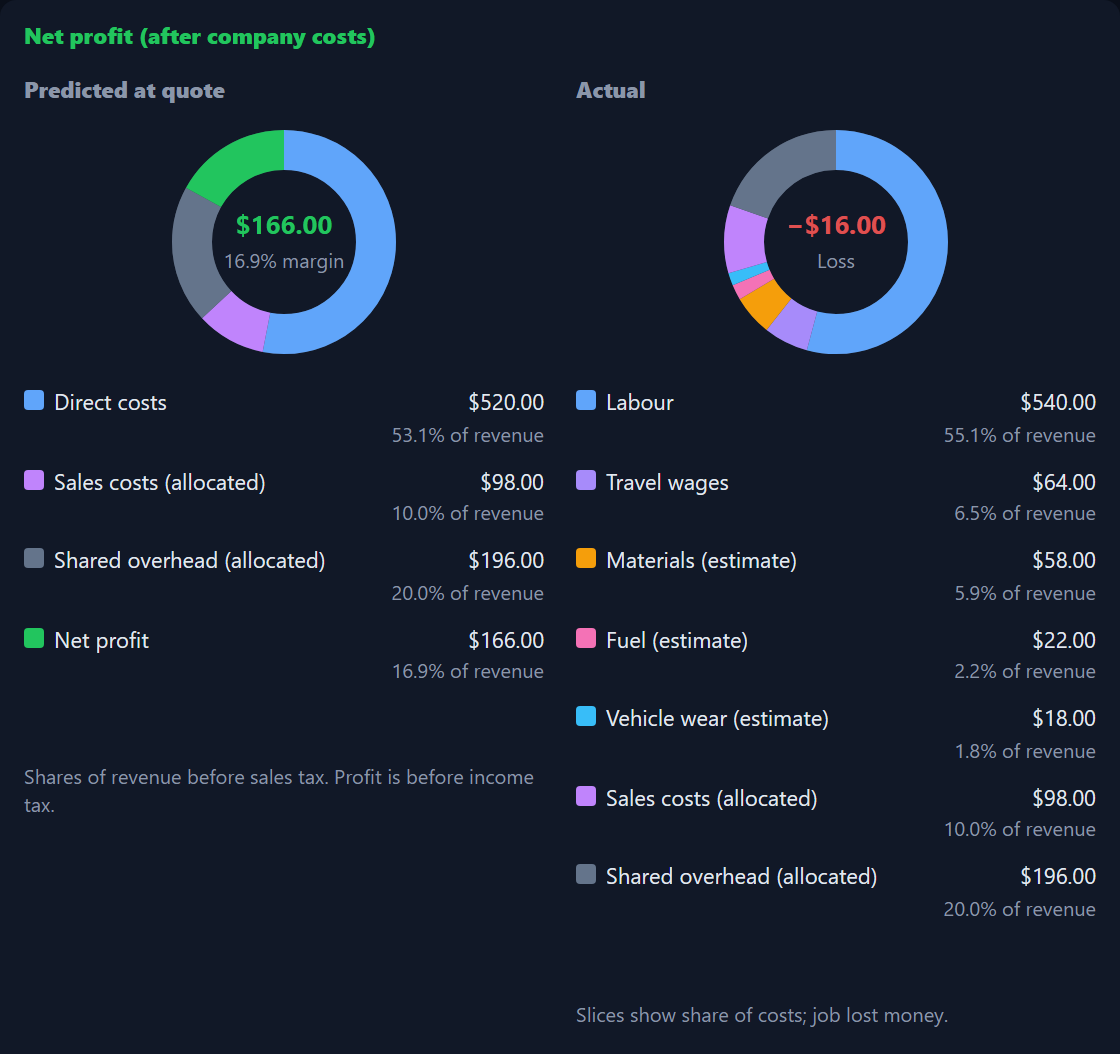
Every finished job shows up in the Job Profitability report. You see what the quote predicted, what the job really made after wages, travel and materials, and the difference. Jobs under 30% are flagged, so the ones that lose money can't hide inside a good month.

  • Predicted profit at quote time next to tracked profit after the job
  • Open any job to see its net profit after company costs
  • Low-margin jobs flagged in red
  • Export the list to a spreadsheet

How job costing works →

CrewBrain net profit breakdown for one sample job: predicted at quote $166 profit, actual a $16 loss after labor, travel, materials and company costs
One sample job, opened. The quote predicted $166 profit. After the real labor, travel and company costs, it lost $16.

Scheduling and dispatch

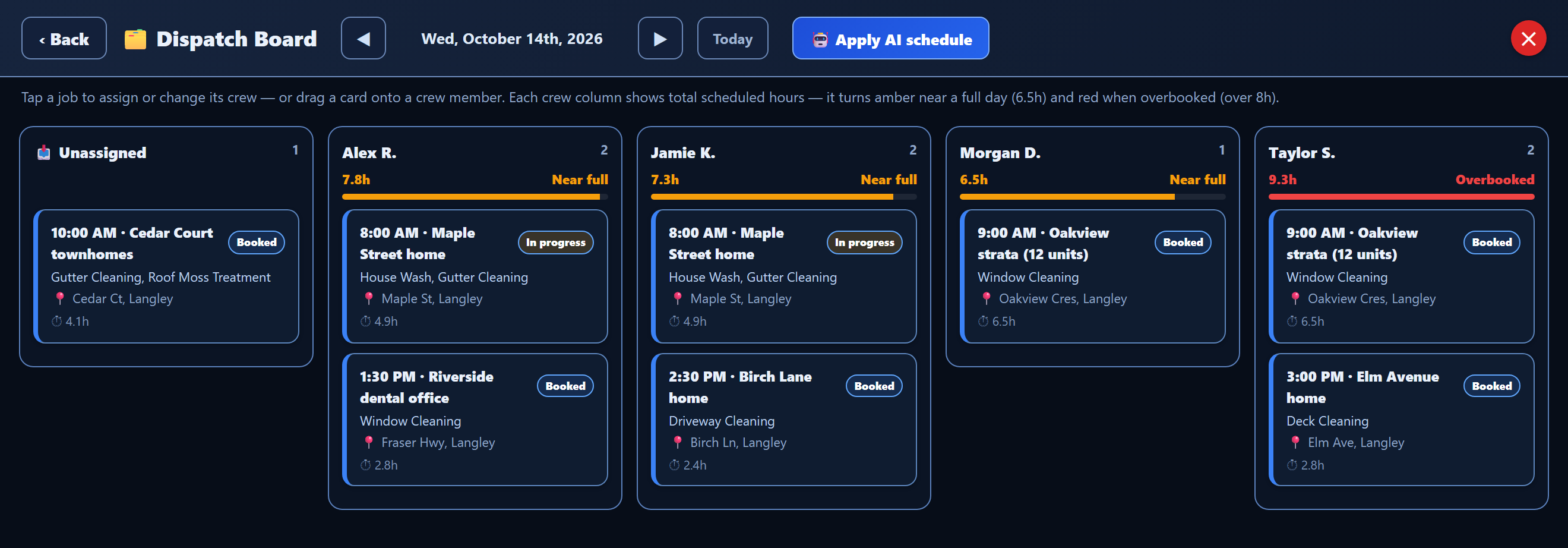
Put jobs on the day, give each one the right crew, and see who is overbooked before it happens. Clashes show up before the day starts, so you get fewer double-bookings and fewer “wait, who’s on that job?” calls.

  • A Dispatch Board for each day, with a column for every crew member
  • Drag a job onto a crew member to assign it
  • Hours turn amber near a full day and red past eight hours
  • Apply the AI schedule to fill a day’s crews in one step
CrewBrain Dispatch Board for one day with an Unassigned column and four crew columns, hours meters and one crew member overbooked
Dispatch Board. Six sample jobs across four crew members.

Crew app (in any phone’s web browser)

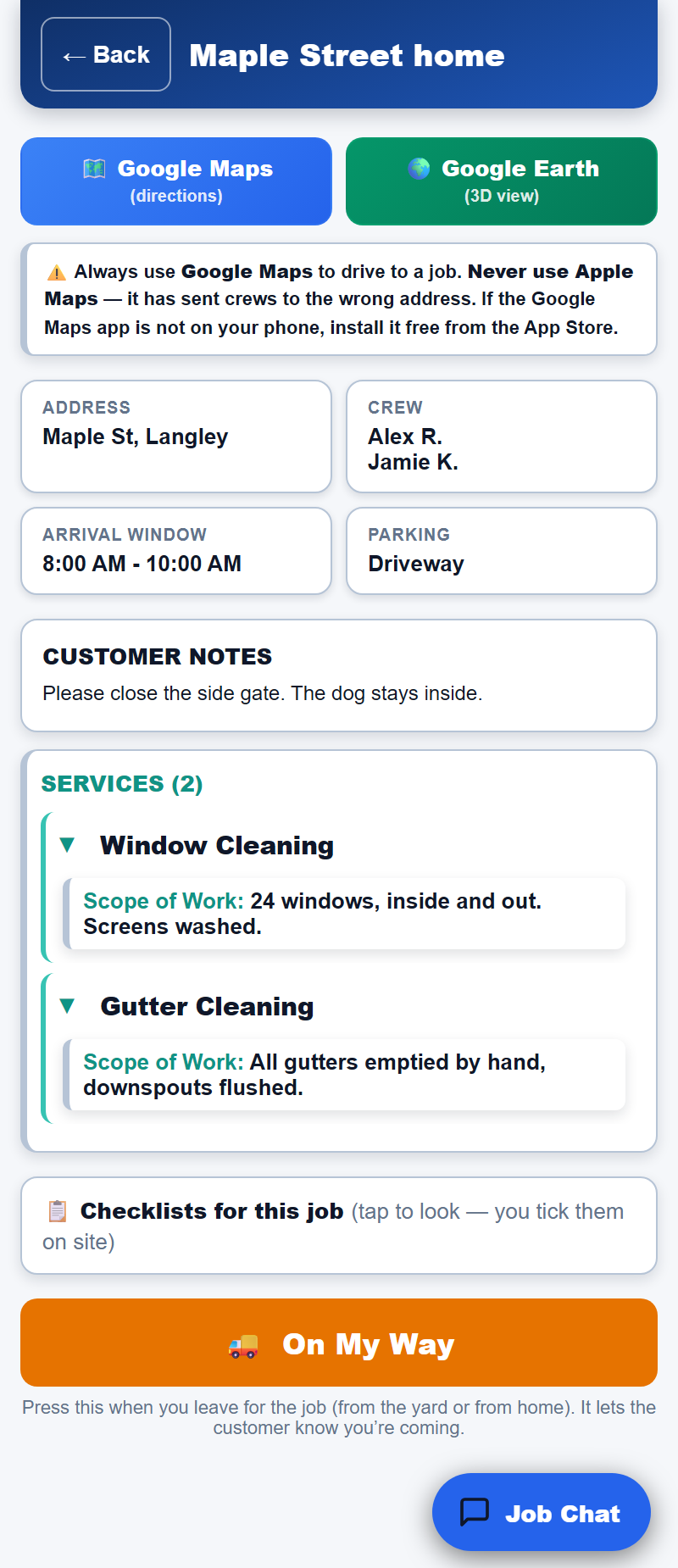
Your team’s day in their pocket: today’s jobs, the address and crew, the customer’s notes, checklists and before-and-after photos. It runs in the phone’s web browser, so there is nothing to install.

  • Clock in and out from the app, and the hours are ready for payroll
  • Your checklists and photo steps on every job
  • Job Chat with the office, right from the job
CrewBrain crew app showing a sample job with address, crew, arrival window, customer notes, services and an On My Way button
Crew app. A sample job, as the crew sees it.

Your services and prices

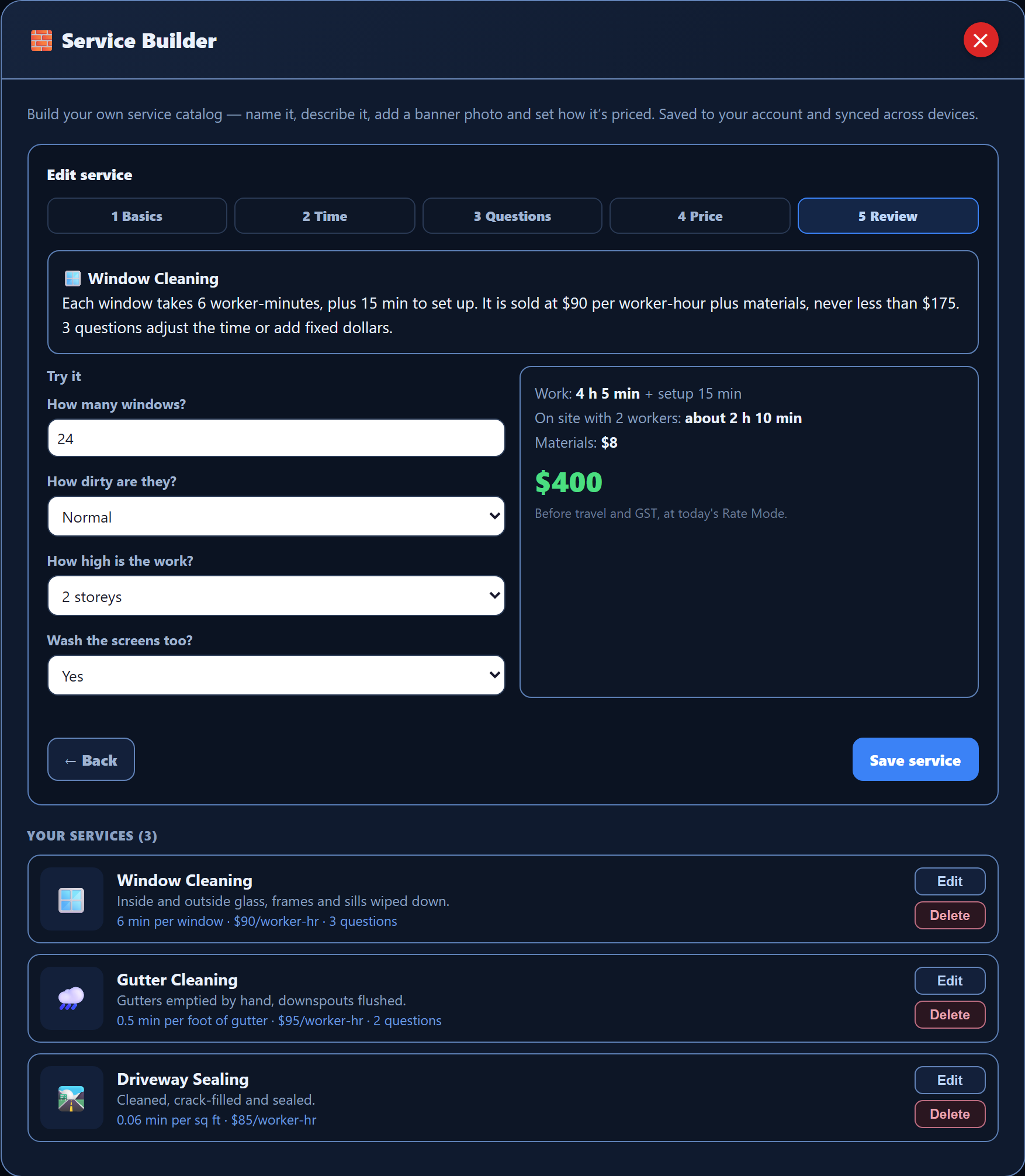
Build your own services in the Service Builder. Each one is priced from the time the work takes, plus materials, a minimum charge and travel. Answer the Try it questions to check the price before you save.

See everything you can change →

CrewBrain Service Builder on the Review step for a sample window cleaning service, with Try it answers and a $400 price
Service Builder. A sample window cleaning service with its Try it price.

A community of owners

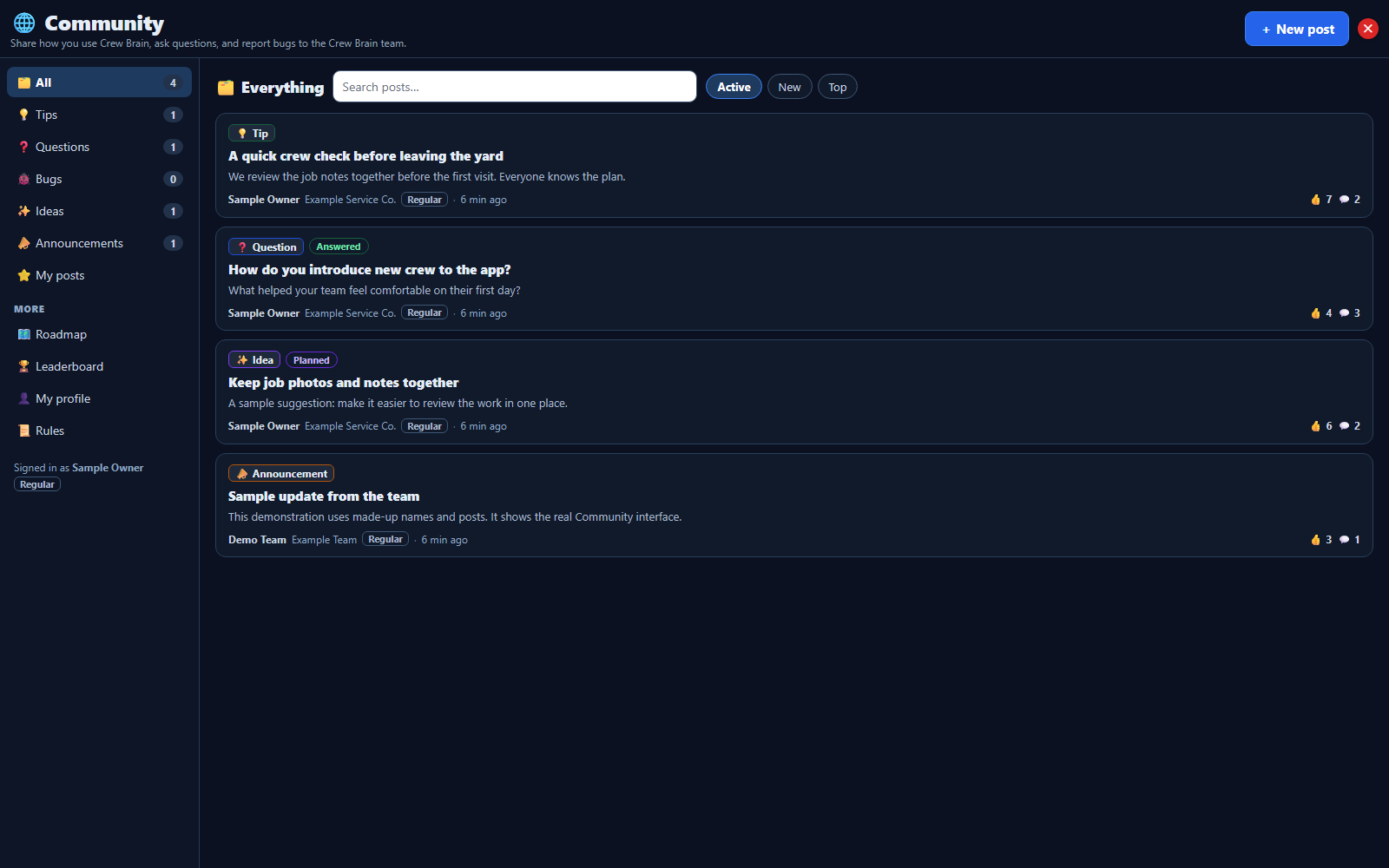
A private place inside CrewBrain where founding members share tips, ask questions, report problems and suggest what we build next. It opens once a few founding members have joined; until then your ideas and bug reports go straight to our team.

See how the Community works →

See what we built from feedback →

CrewBrain Community feed showing sample tips, questions, ideas and an announcement
The real Community screen, with sample data. The names and posts are made up for this picture.
And everything around it

One system for the whole office.

CRM with quotes & invoicing

Every customer, job, quote, and invoice in one record. Send a polished quote in minutes, turn it into an invoice in a tap, and a daily follow-up list shows the ones who went quiet — so you win more of the work you already quoted.

Daily follow-up list

One list each morning shows every quote and lead that needs a follow-up, with the customer's full history a click away. You or your office make the call or send the note, so no lead goes cold just because nobody remembered.

Checklists & job photos

Build the checklist for each service once, and the crew sees it on every job, with before-and-after photo steps. The photos stay on the job record, so a "you missed a spot" call is settled in seconds.

Timesheets

Crew clock in and out from the app, hours are tracked by job, and the totals are ready for payroll. No paper timecards, no end-of-week math, no arguments about who worked what.

Invoices & what's owed

Turn a finished job into an invoice and see what's owed and what's been paid on the same record. Keep your own Square or Stripe for card payments and your own books for the accounting.

White-label branding

Your logo, your colors, your name — on the customer-facing pieces and the crew app. CrewBrain runs the engine; your brand stays front and center the whole way through.

Sales and work booked ahead

See this month's sales and the work already booked for the weeks ahead, in one report. You know when to push for more jobs and when the calendar is full — without building a spreadsheet.

AI assistant

A built-in assistant that reads your records, drafts replies and quotes, suggests what to do next, and surfaces what actually needs you. You check it and press Apply, so it handles the busywork while you keep the final say.

The human side

The part other software leaves out.

Every membership includes real people who help you set up CrewBrain and use it to grow: your account manager, a monthly software check-in and one free First Numbers Review. Coaching is a service you can add, agreed on the call.

A dedicated account manager

One real person who learns your business and stays your point of contact — not a ticket queue. They know your name, your services, and your goals, and you message them directly when you need help. You're never left to figure it out alone.

Growth consulting & coaching

Coaching is one of the services you can choose to hand us. We've grown service companies ourselves, and we pass on what works: pricing for profit, following up so leads don't go cold, turning happy jobs into reviews and repeat work. CrewBrain helps you run the business and grow it with modern methods.

Done-with-you onboarding & migration

Your account manager moves your customer list, services, and pricing over for you, and checks it all with you before you switch. No data entry marathon, no "import it yourself" — you go live with everything already in place.

See the setup steps →

Crew training

We walk your team through the crew app so nobody's confused on the first job. Your crew learns how to see jobs, clock in, snap before/after photos, and message the office — so they're job-ready on day one instead of fumbling with new software.

Set up for the way you work

We work through your services, pricing, checklists and crew roles with you. Your branding stays your own. Any extra custom work is agreed before it starts.

See what you can change →

A say in what we build

Bring ideas from your working day straight to our team, and to the member community once a few founding members have joined. We review suggestions, group similar ones, and explain what we're taking forward. Every idea is heard; not every idea will be built.

See what we built from feedback →

See it on your own business.

Apply to become a founding member. If we're a fit, your account manager sets it up with you: the software, the move from your old tools, and any coaching you choose.

CrewBrain is set up for your trade: pressure washing, window cleaning, cleaning, landscaping and lawn care, moving, pest control, pool service and HVAC, plus 18 more trades. Comparing tools? See CrewBrain next to Jobber, Housecall Pro and ServiceTitan. New here? Start with how it works.